Showing posts with label iOS. Show all posts

iPhone Contact Management App That Displays Social & Email Interactions

No matter how much you like iOS, there are a few areas of iPhone which do need some improvement. One such features is the stock Contacts app, which is far from perfect. For instance, there is no option to delete your contacts in bulk. Fortunately, there are a lot of third party apps which fill the void created by these omissions. Smartr Contacts is one such app, and it will automatically pull all your contacts as soon as you connect relevant accounts with it. Not only that, the app will manage all the contacts for you too, so that they can be used more efficiently.
Smartr Contacts SettingsSmartr Contacts iOS
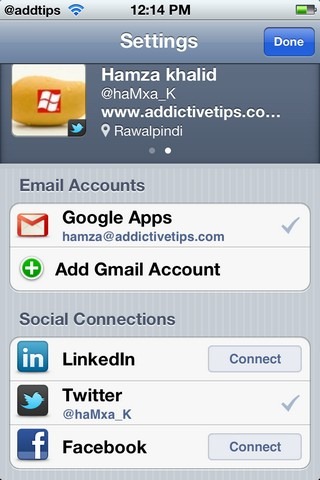
We have already covered the Android version of the app. For the iOS version, before you can start using Smartr Contacts, you will need to sign up for a new, app-specific account. To do that, all you need is any email ID and a new password. Once that has been done, two types of accounts can be linked to Smartr Contacts; email accounts and social networks. The ID you used to sign up for the app will be linked automatically to it, and everyone who has ever mailed you on that ID will be listed in your contacts list. The options for adding other email accounts to the app include Gmail and Outlook. If you are active on Facebook, Twitter or LinkedIn, the app can pull those contacts for you too.
Smartr Contacts InfoSmartr Contacts History
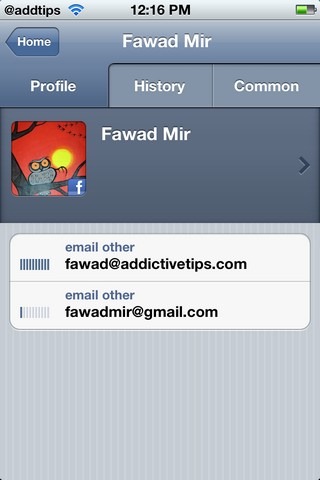
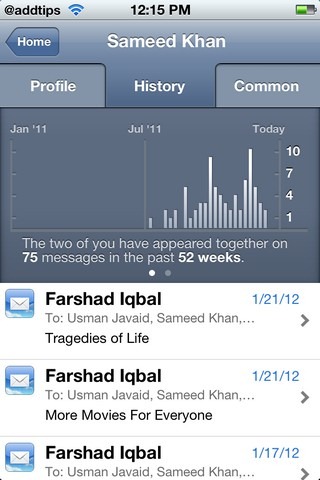
Once all your contacts have been pulled from the address book in your iPhone, iPad or iPod touch, the app will list them based on their frequency of use. This way you are likely to find important contacts without having to look for too long. Smartr Contacts also keeps tracks of your interactions with all the added users, and you are shown a graphical representation of your interaction. The app is also useful for integrating information for all your contacts, no matter on which service you are in touch with them. In the Common section of Smartr Contacts, you get to know if there are any communications in which you and that friend have appeared together. The app will also associate photos with all the contacts, as long as they have set one up on at least one of the linked accounts.
Smartr Contacts is a free app, and if you are looking for an alternative to the stock Contacts app in your iOS device, then this is just the app you need. You can download Smartr Contacts by heading to the download link below.
Download Smartr Contacts
Continue Reading

StartDial: Choose Default Menu On Launching Phone App In iPhone [Cydia]

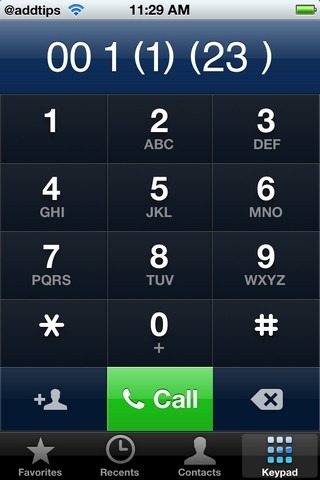
Cydia is all about making the overall iPhone experience more efficient and productive for users. The developers strive to do that by working on every little aspect of iOS, and bringing something new to the table, no matter how small the change might be. StartDial is one such tweak, which is all about giving you more control over your iDevice. It makes the stock Phone app smarter, so that it will know which section to display each time you launch it. In addition to its own decision-making power, you can also choose any section as your default Phone display using StartDial. Of course, there are many third-party apps that acts as standalone dialling options (and come with a lot of extra useful features), but having a tweak that customizes the stock Phone app is certainly something a lot of people can use.
StartDialStartDial Settings
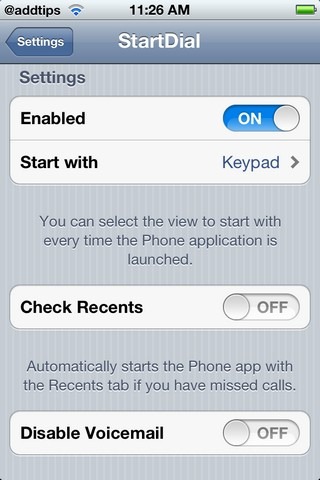
The tweak can be downloaded from the Big Boss repo in Cydia store, and once it has been installed, you can start customizing the Phone app from the Settings app in your device. StartDial will appear in the Extensions tab in Settings. First of all, you will have to make sure that the tweak is Enabled, via the first option present in the menu. You can choose any of the 4 menus as your default Phone.app launch screen, including Favorites, Recents, Contacts and Keypad.
However, as we mentioned earlier, the tweak is smart. This is because there are options like Check Recents in it. If you toggle that setting on, the Recents section will automatically show up every time there have been some missed calls that you have not seen yet.  Also, not a lot of users ever open the Voicemail section in the dialer, and it can prove to be a nuisance while you are trying to dial a number quickly with only one hand, as people keep hitting it mistakenly due to its placement. Due to all these reasons, StartDial has an option titled Disable Voicemail, which makes the Voicemail menu go away completely. Obviously if you often use voicemail, this is a feature of the tweak that you will want to stay away from.
The tweak is free, and with the level of usability it offers, jailbreak users must give StartDial a try. The best thing about the tweak is the customizable options and Settings it offers, as you can choose the functionalities you want to keep while enjoying some really cool new stuff on your iPhone.
Continue Reading

Add A Feature-Rich File Downloader To Google Chrome For iOS

When the Chrome Download Manager tweak was released last year, a lot of people thought that a better alternative will soon make its way to the Cydia store, but even after all that time, we are still looking for the perfect downloader that works with Google Chrome for iOS. As it has been around for longer, Safari has some pretty decent download managers, like Safari Download Enabler. Chrome Downloader is the latest download manager to come out for Google’s iOS web browser. It has seamlessly integrates with the web browser much like the aforementioned Safari DE and supports just about any file format that you have ever heard of. Even if you find a file that isn’t compatible with the tweak, you can remedy that by manually configuring Chrome Downloader to always start a download session when a particular type of link is tapped within Chrome.
Chrome Downloader iOS SettingsChrome Downloader iOS File Types
Although Chrome Downloader adds a new option of its own to the browser, you can tinker with its basic properties by heading to the tweak’s Settings app menu. A staggering number of file formats are supported by the tweak, and as soon as you tap a link pointing to any of these files, Chrome Downloader takes over. If you think this automation is a bit annoying, simply disable the formats you use most frequently. At the other end of the spectrum, more formats can be added to the mix by using the ‘Add New File Type’ option. Within this section, you have to define the target format’s extension name, MIME types and a display name for the entry.
Chrome Downloader iOS OptionChrome Downloader iOS Download PageChrome Downloader iOS
To see Chrome Downloader in action, launch the Google Chrome app on your iPhone. The new ‘Download Manager’ option is added to the top of the browser’s main menu. There are two ways of initiating a download using the tweak. You can either long-press any link and then choose the ‘Download File’ option from the resulting menu, or let Chrome Downloader figure by itself that the link you last tapped belongs to a compatible file format. In both cases, it is possible to rename the file, change its destination, or simply view it in another app. The main screen of the tweak shows a download percentage, the size of data you have downloaded, and the speed at which your data connection is working. Chrome Downloader places a badge on the menu icon to represent ongoing downloads. If you put Chrome into the background during a session, the tweak sends a notification upon the completion of every download.
The files downloaded via Chrome Downloader can be opened with iFile, Dropbox or other similar apps. The tweak works even in the browser’s incognito mode, and allows users to change the primary location of their downloads. All these features will cost you $1.50, so get it from Cydia Store if you are an avid user of Chrome for iOS.
Continue Reading

How To Download Any File Using Safari For iPhone [Cydia]

By default, Safari only supports downloading very few file formats, and if you want to grab any other file, you will need the assistance of some third-party app. However, if you are familiar with iFile, you are sure to have noticed that it can handle almost all popular file formats. Now combine iFile with Safari, and the possibilities are endless. That’s what Safari Download Enabler does, to some extent, at least. If you have a jailbroken iPhone, iPad or iPod touch, this newly-released Cydia tweak will let you download any file, opening it in iFile or any cloud service of your choice (like SkyDrive or Dropbox). Does Safari Download Enabler sound like a tweak you can use? Read on to learn more about it.
Safari Download Enabler menuSafari Download Enabler
Instead of adding a new button and ruining the organization of a whole menu, Safari Download Enabler simply replaces the Add To Reading List button with the download button. For everything to work perfectly, grab iFile, SkyDrive or Dropbox before you install this tweak. After that, you can install Safari Download Enabler from the BigBoss repo in the Cydia store. The tweak won’t add any Springboard or Settings icon to your iDevice, as everything works automatically. To see the tweak in action, launch Safari and go to any page listing a file other than a photo. Just long-press the link, and you will see the Download Linked File button added by Safari Download Enabler.
In case you have more than one compatible file-handlers installed on your device, you will get the option to choose between them before opening the file. Safari Download Enabler is certainly a useful tweak, and is really unobtrusive. Admittedly, there are many other download management options available for iOS too, but the integration this tweak enjoys with iFile makes it a cut above the rest. With Safari Download Enabler you won’t have to launch a third-party app every time you want to view or use the downloaded content. One of the best things about the tweak is the fact that you can easily use other clients for file management via different cloud services, as for most of them, there is no easy way of importing content from the phone’s own file system to the cloud. Add to the mix Safari Download Enabler’s price tag of $0, and you just have to give the tweak a try if you own a jailbroken iDevice, and know how to use iFile.
Continue Reading

Get A Functional Download Manager In Chrome For iPhone & iPad

The intuitive interface, the real-time tab syncing and gesture controls in the Chrome app for iOS were enough to make it a worthy competitor for Mobile Safari, but thanks to all the amazing Cydia tweaks available for Chrome, Google’s web browser for iPhone and iPad has arguably become the best app of its genre for iOS. It does have its fair share of negatives, most prominent of which is its rather slow speed, but the features on offer in Chrome are so awesome that they have the potential to make anyone forget Safari. However, one thing that’s still far from perfect in Chrome is the ability to download files directly. Although a tweak named Chrome Download Enabler was released a few days back, it lacked any interface whatsoever, and was also really buggy. Thankfully, we now have a better alternative for downloading content via Chrome for iOS. Chrome Download Manager is a tweak that makes the whole process of initiating, managing and viewing downloads really smooth. With this tweak you will be able to download files belonging to almost all file formats, and then open (or save) those files via iFile or other similar apps.
Chrome Download Manager OptionsChrome Download Manager ListChrome Download Manager Sharing
Chrome Download Manager adds a new Downloads button to the Chrome options menu, and it is from there that you can view all the files that are being downloaded or have been downloaded via the tweak. Whenever you try to download a new file, you will be taken to a new screen by Chrome Download Manager, where you will be able to initiate the download, or cancel the whole process. The top bar shows the name of the file that you are trying to download, along with its format and the location where it will be saved. Once a download has been started, you will be shown a page saying that Chrome cannot download the said file. Just ignore that page, and go to the newly added Downloads section. You will see that the download is in progress.
Once the download is complete, you can tap the file to delete it, share it via email or open it with any app that has the ability to handle that particular format. If you don’t have any other client, make sure that iFile is installed on your iPhone or iPad, as it can handle all the file formats that are downloadable via Chrome Download Manager. The Downloads menu in the tweak houses options for deleting all downloads, via the Cancel All button. All your downloads will remain listed under the new section unless you delete them in this manner.
The tweak is available for $3 in the ModMyi repo of the Cydia store, and if you have completely switched to Chrome from Safari, then the price is totally worth it.
Continue Reading